

Contains
Checks whether a text contains another text, with or without matching letter case, and returns true or false.
Contains checks whether a text includes a given value anywhere inside it, for example whether an email subject contains invoice. It returns true or false, so you can use the result in a decision.
Add the action
In the Process Designer toolbox, open String and pick Contains (or type Contains in the search box). The List folder has an action with the same name that works on lists; make sure you pick the one in String.
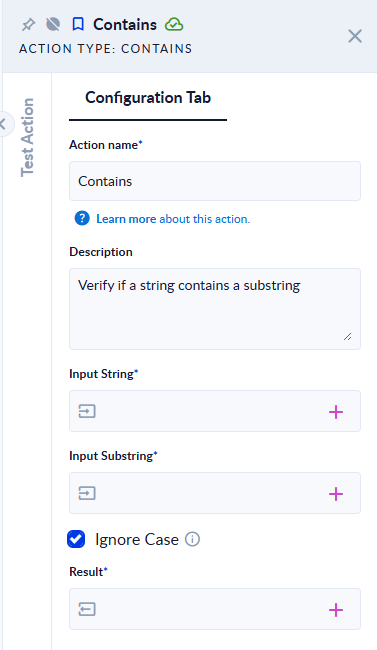
Inputs and outputs
| Field | Direction | Type | Required | What to put / what you get |
|---|---|---|---|---|
| Input String | Input | Text | Yes | The text to search in. It cannot be empty. |
| Input Substring | Input | Text | Yes | The text to look for. It cannot be empty. |
| Ignore Case | Input | Boolean (true/false) | No | Tick it to ignore the difference between uppercase and lowercase. Off by default. |
| Result | Output | Boolean (true/false) | Yes | true if the substring is found, otherwise false. |
Example
| Input String | Input Substring | Ignore Case | Result |
|---|---|---|---|
Payment received | received | off | true |
Payment received | RECEIVED | off | false |
Payment received | RECEIVED | on | true |
Ștefan | ș | on | true |
Ștefan | stefan | on | false |
Good to know
- Case-sensitive unless you tick Ignore Case. Ignore Case does not ignore diacritics:
stefandoes not matchȘtefan. Use Normalize Diacritics on both values first if you need that. - Empty values fail the step. An empty Input String fails with "Input String was null. Please, fill it.", an empty Input Substring with "Input Substring was null. Please, fill it." Check optional values with Null Or Empty first.