

To Sentence Case
Capitalizes the first letter of every sentence in a text.
To Sentence Case makes the first letter of every sentence uppercase. A new sentence starts after a ., ! or ?. Use it to tidy up text typed without capitals before you put it in an email or a document.
Add the action
In the Process Designer toolbox, open String and pick To Sentence Case (or type To Sentence Case in the search box).
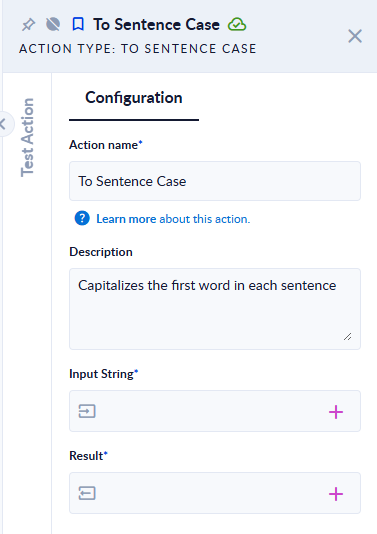
Inputs and outputs
| Field | Direction | Type | Required | What to put / what you get |
|---|---|---|---|---|
| Input String | Input | Text | Yes | The text to convert. |
| Result | Output | Text | Yes | The text with the first letter of each sentence in uppercase. |
Example
| Input String | Result |
|---|---|
hello there. how are you? fine! ok | Hello there. How are you? Fine! Ok |
hELLO WORLD. 3 apples. ştiu. | HELLO WORLD. 3 Apples. Ştiu. |
Good to know
- Only the first letter of each sentence changes. Other letters keep their case, so
hELLO WORLDbecomesHELLO WORLD, notHello world. Run the text through To Lower first if you want the rest in lowercase. - Digits and symbols are skipped: in
3 applesthe first letter,a, is capitalized. - Every
.starts a new sentence, including the dot in an abbreviation or a decimal number. - An empty input gives an empty result.