

Get Index
Returns the position of the first occurrence of a text inside another text, counting from 0, or -1 if it is not found.
Get Index tells you where a value first appears inside a text. The position counts from 0 (the first character is at position 0). If the value is not found, you get -1. Combine it with Take From Left, Take From Middle or Substring to cut a text at a marker.
Add the action
In the Process Designer toolbox, open String and pick Get Index (or type Get Index in the search box). The List folder has an action with the same name that works on lists; make sure you pick the one in String.
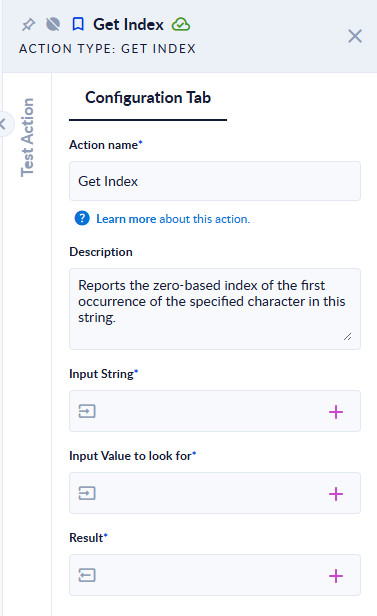
Inputs and outputs
| Field | Direction | Type | Required | What to put / what you get |
|---|---|---|---|---|
| Input String | Input | Text | Yes | The text to search in. |
| Input Value to look for | Input | Text | Yes | The character or text to find. |
| Result | Output | Integer | Yes | The position of the first occurrence, counting from 0, or -1 if it is not found. |
Example
| Input String | Input Value to look for | Result |
|---|---|---|
Hello world | o | 4 |
Hello world | world | 6 |
Hello world | W | -1 |
Hello world | z | -1 |
Ștefan Ș | S | -1 |
Hello | (empty) | 0 |
Good to know
- Positions start at 0.
- The search is case-sensitive, and a letter with a diacritic is a different letter (
Sdoes not findȘ). - Only the first occurrence is reported.
- An empty value to look for returns
0.